How to Build AI Agents | TechFoundry AI
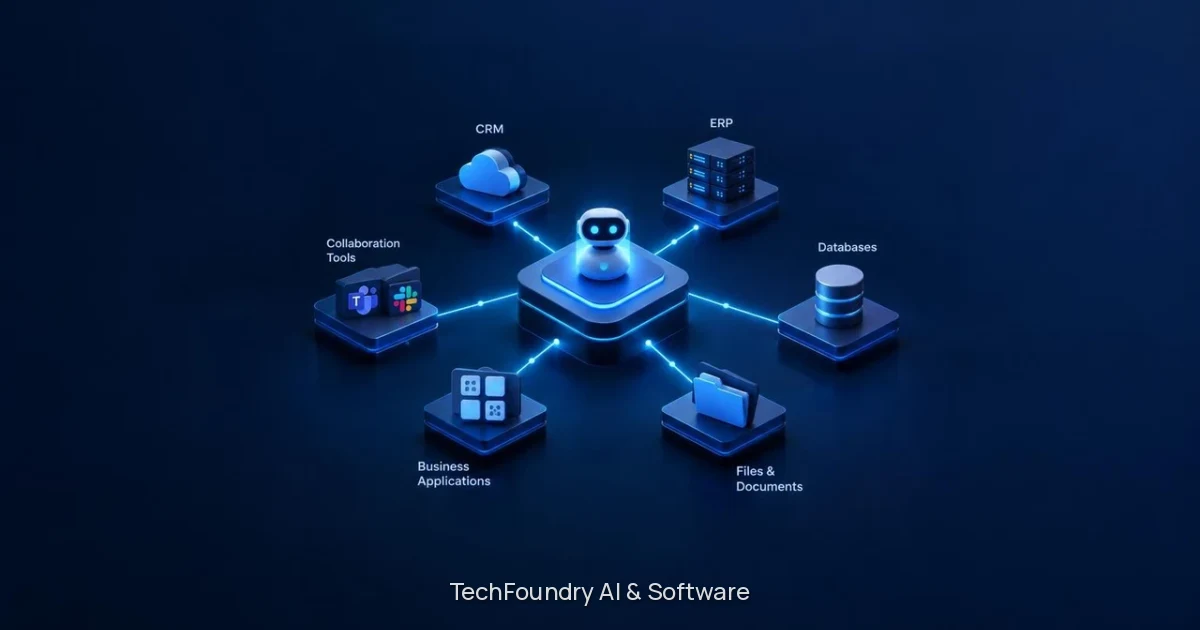
An AI agent reads requests, uses business tools through controlled interfaces and hands important decisions back to people for review. You define which actions proceed automatically and which require approval, then connect the agent to the tools you already use. The result is an automated workflow that reduces manual work while keeping your team in control.
Quick summary
Question | Answer |
|---|---|
What does an AI agent do? | Reads requests, acts on them using connected business tools or asks for review, then reports the result. |
What does it need? | Context (approved documents and records), tools (controlled interfaces to business systems) and human review points (escalation paths for exceptions). |
When should you use one? | When you have standardized tasks with consistent inputs, clear rules and known exceptions that currently require manual work. |
How is it different from workflow automation? | Workflow automation follows fixed rules. Agents interpret unstructured input, handle variation and decide which tool to use. |
What does TechFoundry need from you? | Access to the systems and documents the agent has to read, a person who can decide what needs review and patience with a first version that escalates more than it eventually will. |
What an AI agent does in business operations
An AI agent reads a request, acts on it using connected business tools or asks for review, then reports the result. This read-act-review pattern is what separates agents from chatbots or simple automation.
A chatbot answers questions in conversation. An agent takes action: it reads an incoming purchase order, matches line items against inventory, allocates stock or raises a supplier order, and escalates anything ambiguous to a person who can decide. Simple automation follows fixed rules; an agent understands context and adapts to variation within the boundaries you set.
The surrounding workflow determines what the agent can access, which actions it may take and when someone needs to review its work. A conversational interface is only one part of an agentic system. The system includes the tools the agent can use, the documents and records it can see, the permissions that control what it can do automatically and the escalation paths that route uncertain cases to people.
The three components every agent needs
Every working agent needs context, tools and human review points.
Context means the agent uses approved documents, records and instructions; you define what the agent can see. An order intake agent might see product catalogs, pricing tables, customer records and order templates, but not payroll data or unrelated correspondence. The context shapes what the agent understands and how it interprets requests.
Tools are the specific operations the agent can perform, exposed through controlled interfaces with permissions appropriate to the task. An agent might be able to read inventory levels, draft purchase orders and send confirmation emails, but not approve payments or delete records. You connect selected business tools and define which actions can proceed automatically and which require approval.
Human review points are the escalation paths that route decisions back to people when the agent encounters something outside its scope. One agent in production reads incoming purchase orders, validates them, matches every line against SAP equipment and either allocates stock or raises supplier orders; anything ambiguous goes to a conflict queue instead of being guessed. The agent reduces manual work on routine cases and hands exceptions to the people who can resolve them.
How to define what your agent should automate
Start with tasks you have already standardized: consistent inputs, clear rules and known exceptions. Standardization is the prerequisite for automation. If the workflow changes every time or relies on undocumented judgment, the agent will escalate most cases and add overhead instead of reducing it.
Look for emails, documents or data that arrive in a predictable format, follow a process you can describe in steps and have outcomes you can verify.
Define which actions are low-risk enough to proceed automatically and which need a person to review before the agent acts:
Action type | Automatic or review? | Example |
|---|---|---|
Exact match, stock available | Automatic | Matching a part number against a catalog and allocating stock |
Substitution or override | Review required | Substituting a similar part, overriding a credit limit or changing a delivery address |
The boundary between automatic and review-required depends on your risk tolerance and the cost of a mistake.
Describe the problem, the people affected and the systems involved. You do not need a finished specification to begin. Tell TechFoundry the outcome you want, share your existing tools and constraints, and the team will define the next step together. The goal is to turn a business need into a working agent connected to real tools, not to write a requirements document in isolation.
Connecting agents to your existing systems
An agent can connect to any system with an API or structured data source: email, CRM, ERP, document storage, order systems and internal databases. You define which tools the agent can access and which actions require approval. The integration depends on the platforms you use; TechFoundry assesses the tools you already have before recommending another one. Access, APIs and data ownership shape the integration.
Testing normal paths, exceptions and access is part of the build. Develop in reviewable increments and test each workflow before adding more. Build representative scenarios, review failures and define escalation paths. An agent that works in a demo might fail when it encounters a missing field, a duplicate record or a request outside its training. Testing realistic scenarios means using actual emails, documents and edge cases from your operations, not just the happy path.
Track useful outcomes rather than relying on a polished demo alone:
How many requests does the agent handle end to end?
How many does it escalate?
Are the escalations appropriate?
Adjust the boundaries as you learn which cases the agent handles well and which need refinement. The first version will escalate more than it eventually will; that is expected and safer than an agent that guesses.
Building in reviewable increments
Building in reviewable increments means developing and validating one workflow at a time, testing edge cases and maintaining control as capabilities expand. You do not wait for a finished system before testing anything. Instead, you build the first workflow, connect it to one or two tools, test it with real data and use it in production while the next workflow is being built. Each increment is small enough to review, test and understand.
This approach reduces risk and keeps the project moving. If the first workflow does not behave as expected, you adjust it before building the next one. If a new requirement emerges, you incorporate it without rewriting everything. The agent grows in capability as each workflow is added, and your team learns how to work with it as it develops.
What TechFoundry needs from you:
Access to the systems and documents the agent has to read
A person who can decide what needs review and what does not
Patience with a first version that escalates more than it eventually will
The process is collaborative. You bring the domain knowledge and the business context; TechFoundry brings the development work and the integration expertise.
Cloud-based workflow automation versus custom agents
Feature | Workflow automation | Custom AI agent |
|---|---|---|
What it does | Connects applications and moves data between them using triggers and actions | Reads unstructured input, matches it against records, decides which tool to use and escalates when unclear |
Best for | Straightforward handoffs with fixed rules and structured inputs | Interpreting documents, handling exceptions and making decisions based on context |
Example | When a form is submitted, create a record; when a record is updated, send an email | Read an email, extract order details, look up parts in an ERP system, draft a purchase order and ask for approval if the part match is ambiguous |
When to use | The task is already standardized, the inputs are structured and the rules are fixed | The task involves interpreting documents, handling exceptions or making decisions based on context |
Many systems use both: workflow automation for the handoffs and agents for the interpretation and decision steps.
When to build your own versus when to start simpler
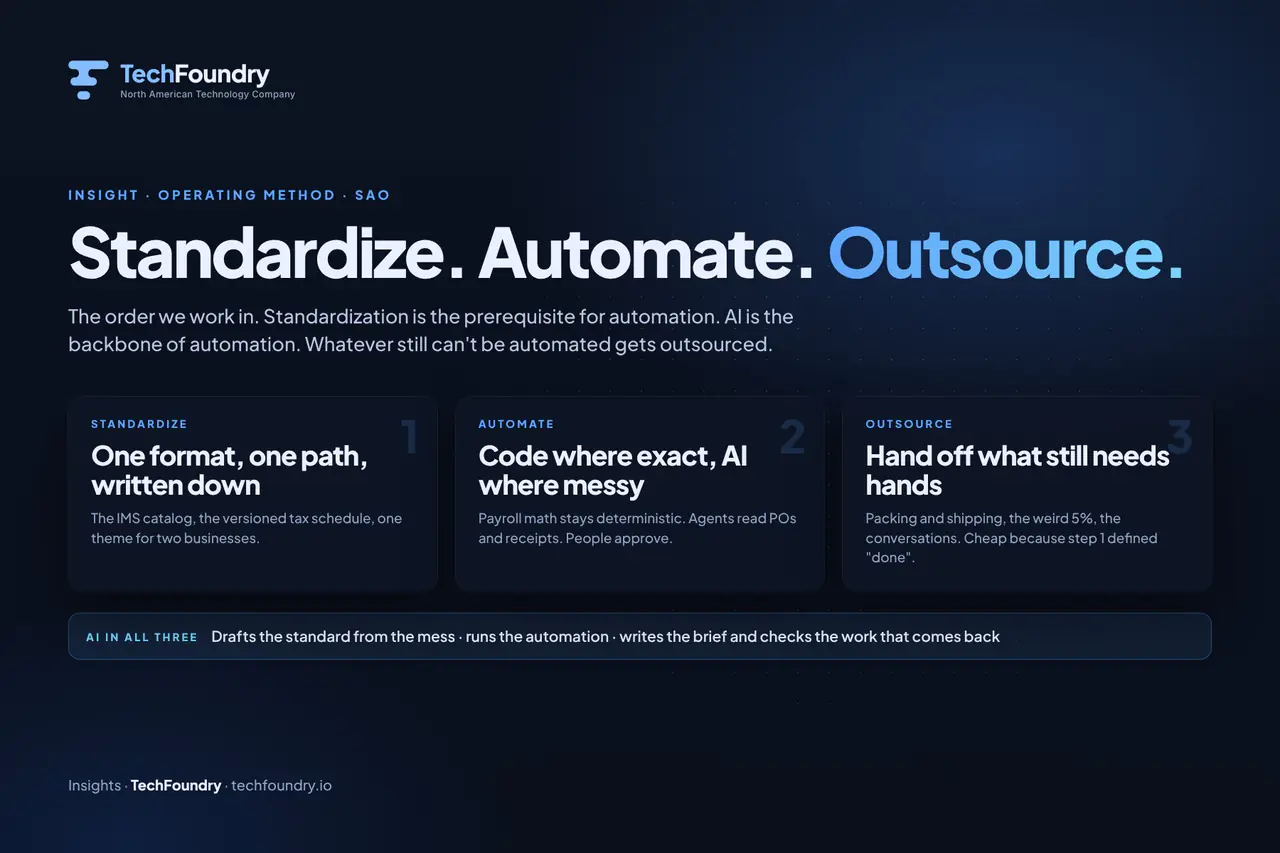
The order matters: standardize, automate, outsource. Standardization comes before automation. If the workflow is inconsistent, undocumented or relies on individual judgment, building an agent will not fix it. The agent will escalate most cases, and you will spend more time reviewing exceptions than you would have spent doing the work manually.
Standardize first: document the steps, agree the rules, handle the exceptions in a consistent way. Then automate.
AI has a role in all three steps, not just the middle one. It can help you document and standardize a workflow by analyzing how the work is currently done. It automates the routine cases once the workflow is stable. It supports outsourcing by handling the handoff and the oversight. But it cannot replace the standardization step.
Start simpler if the workflow is not yet consistent or if you are not sure which tasks to automate. Map the workflow, users, data and constraints. Choose a useful first outcome. Build and validate that outcome before expanding. If you have the outcome in mind but need it built, TechFoundry offers custom applications, AI agents, workflow automation and integration work. The team will come back with a practical next step rather than a sales sequence.
For more on the standardize-automate-outsource methodology, see Standardize, Automate, Outsource: The Order We Work In. For guidance on building conversational interfaces that people can trust, see How to Build a Business Chatbot People Can Trust. To see how a request becomes an action in a working agent system, try the order intake demo. To start a project, visit the project start page.
FAQ
What is the difference between an AI agent and a chatbot?
A chatbot answers questions in conversation. An AI agent reads a request, decides which business tool to use, takes an action or asks for approval, then reports the result. Agents automate workflows; chatbots provide information. A chatbot might tell you the status of an order. An agent reads the order email, matches the parts, allocates stock and confirms the shipment, escalating to you only if something is unclear.
The distinction matters because the requirements are different. A chatbot needs accurate answers and a natural conversation flow. An agent needs access to business tools, permission to act, escalation paths for exceptions and a record of what it did. Both use language models, but the surrounding system is what makes an agent useful in operations.
Can I build an AI agent without coding experience?
Building an agent that connects to real business systems and handles exceptions safely requires development work. If you have the outcome in mind but need it built, a custom development partner can define the scope, build the agent and test it with your team. TechFoundry works with clients who know what needs to work better but do not have the development resources in house.
You do not need to write code yourself, but you do need to define what the agent should do, which systems it should connect to and which decisions require review. The development partner handles the integration, the testing and the deployment. Your role is to provide access to the systems and documents the agent needs, decide what requires approval and review the agent’s work as it develops.
How do I decide which tasks an agent should handle automatically?
Start with tasks you have already standardized: consistent inputs, clear rules and known exceptions. Define which actions are low-risk enough to proceed automatically and which need a person to review before the agent acts. Matching a part number against a catalog might proceed automatically if the match is exact. Substituting a part, overriding a limit or changing a key detail might require approval.
The boundary depends on your risk tolerance and the cost of a mistake. In practice, the first version of an agent escalates more than it eventually will. You review the escalations, adjust the rules and expand the automatic actions as you gain confidence. The goal is not to eliminate human judgment but to reserve it for the cases that need it.
What tools can an AI agent connect to?
An agent can connect to any system with an API or structured data source: email, CRM, ERP, document storage, order systems and internal databases. You define which tools the agent can access and which actions require approval. The integration depends on the platforms you use; TechFoundry assesses the tools you already have before recommending another one.
Access, APIs and data ownership shape the integration. Some systems provide full API access; others require workarounds or manual exports. The agent connects to the tools you already use, automating the manual work between systems without replacing the software that runs your operations.
How long does it take to build a working AI agent?
It depends on the workflow’s complexity and how many systems are involved. Building in reviewable increments means you can test and use the first workflow before adding more, rather than waiting for a finished system. The first workflow might take weeks to define, build and test; subsequent workflows are faster because the integration and the patterns are in place.
The timeline also depends on how standardized the workflow is before you begin. If the process is documented, the rules are clear and the exceptions are known, the build is faster. If the workflow needs to be mapped and standardized first, that work comes before the agent development.
Do I need to replace my existing software to use AI agents?
No. Agents connect to the tools you already use. The goal is to automate the manual work between systems: reading emails, updating records, routing requests, without replacing the software that runs your operations. An agent sits between your email, your ERP, your CRM and your document storage, handling the handoffs and the interpretation steps that currently require a person.
You keep the systems that hold your data and run your processes. The agent reads from them, writes to them and escalates to people when needed. The integration respects the permissions and the audit requirements of the existing systems. For more on TechFoundry’s approach to AI agents and workflow automation, see the main AI page.
Put the idea to work
Have a workflow ready for AI or software?
Show us the process, the systems it touches and the decisions people need to keep. We will help define a useful first release.

Join the conversation
Comments are reviewed before they appear. Your email address will not be published.